TrelloExport 1.9.13
New features for TrelloExport, a Chrome extension to export data from Trello to Excel.
Introducing version 1.9.13
Here’s what’s new for version 1.9.13:
- new ‘DoneTime’ column holding card completion time in days, hours, minutes and seconds, formatted as per ISO8601
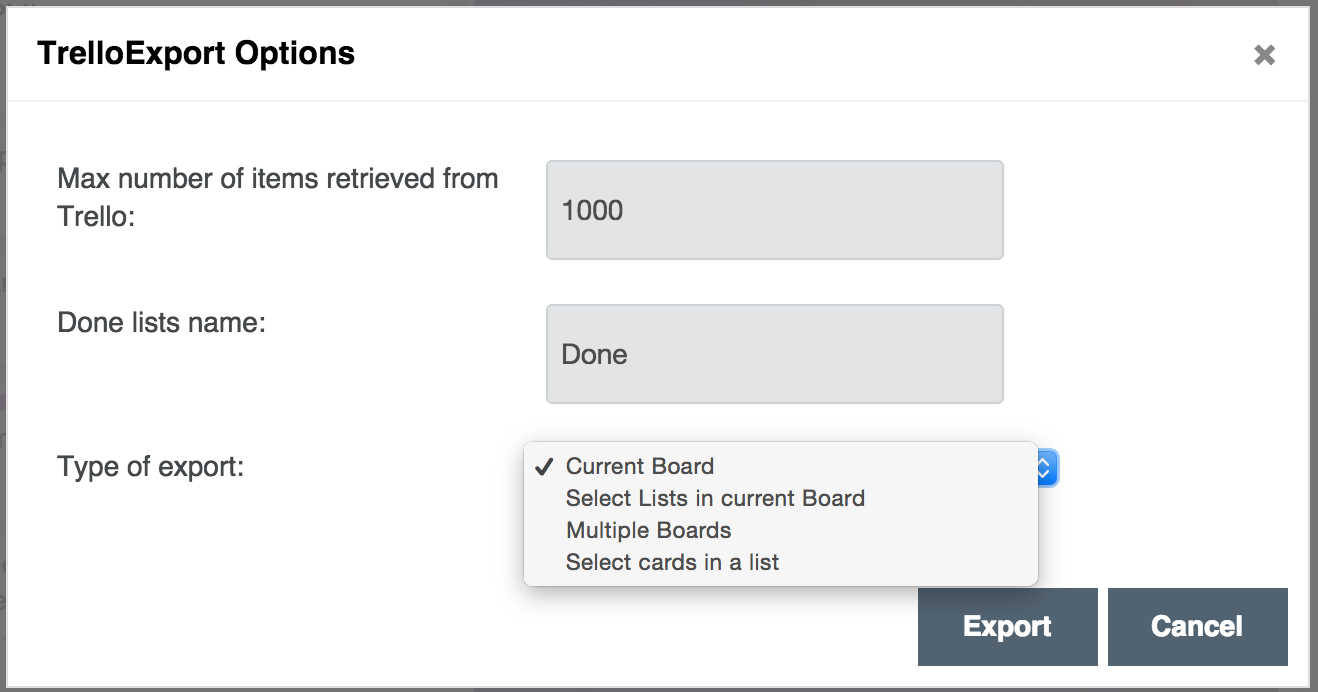
- name (prefix) of ‘Done’ lists is now configurable, default “Done”
- larger options dialog to better show options
- export multiple (selected) boards
- export multiple (selected) cards in a list (i.e. export single cards)
DoneTime
The exported Excel file has now a new ‘DoneTime’ column, holding cards’ completion time in days, hours, minutes and seconds. This time is formatted as PnDTnHnMnS, a short format for ISO8601 durations, like:
P2DT5H4M30Sto mean a duration of 2 days, 5 hours, 4 minutes and 30 seconds.
Done prefix
The “Done” list name is now configurable: this means you can set the name of lists you want to use to calculate cards’ completed status, and now completion time (DoneTime).
Larger Options dialog
The options dialog is larger and holds new options, like the Done prefix and dropdowns for the new kind of exports.
Four options to export
TrelloExport now has four (4) ways to export data:
- Current Board, original functionality exporting all lists and all cards in current board;
- Select Lists in current Board, i.e. export all cards from selected lists only from current board;
- Multiple Boards, i.e. select multiple boards for export;
- Select cards in a list, i.e. select single cards for export.
Feedback!
Your feedback is welcome on all these new features! Also consider some bugs could come out: if so, please open an issue on GitHub or contact me, I’ll do my best to fix it quickly.
Download
Get TrelloExport on GitHub at https://github.com/trapias/trelloExport, and follow the installation instructions in the readme.